
CLI Reference
spec-first CLI 负责确定性操作:检查、快速初始化、安装/刷新 runtime、升级、清理、worktree 修复、task-pack hash/validate、plan 生命周期审计和 session advisory。研发 workflow 本身在 Claude Code、Codex 及 preview 宿主会话中运行。
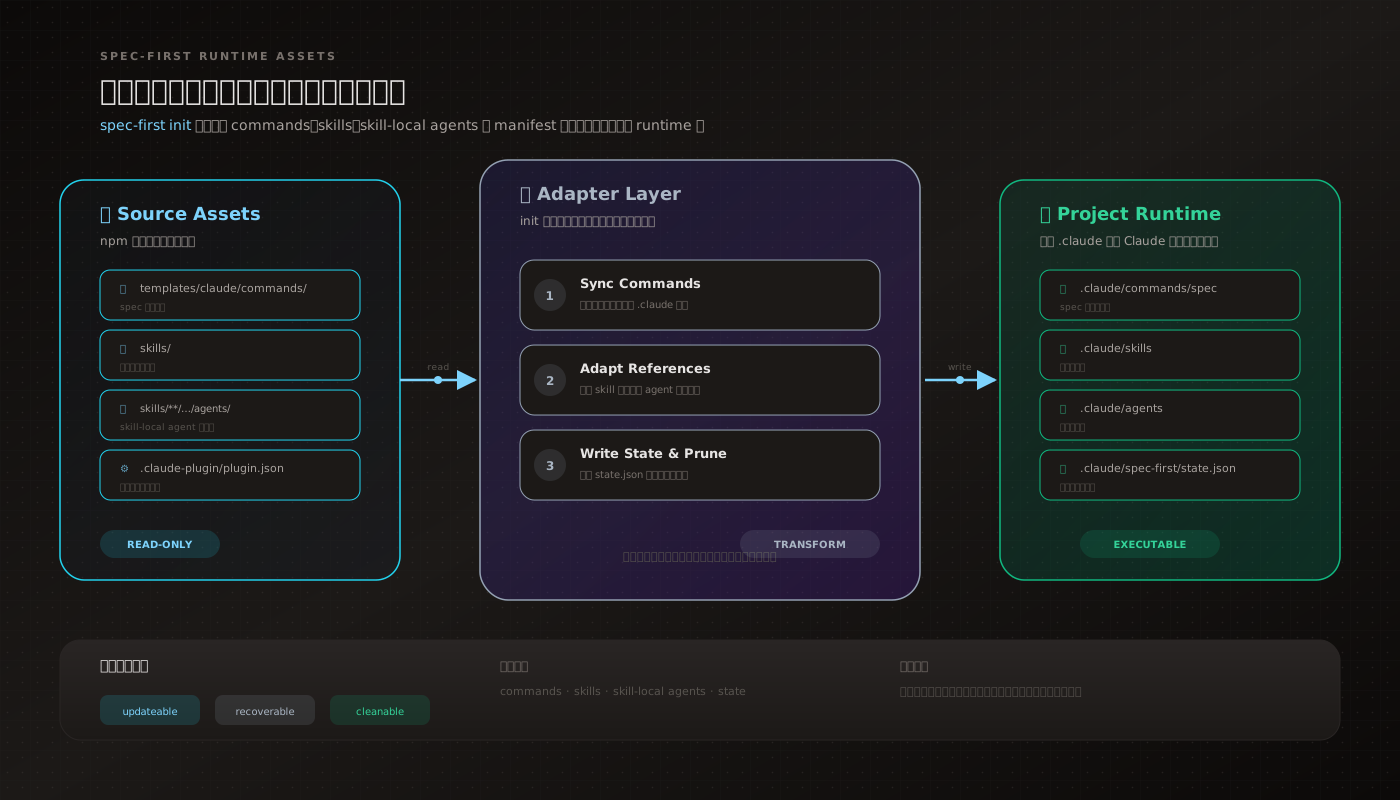
命令总览
spec-first --help
spec-first --version
spec-first doctor [--claude|--codex|--cursor|--kiro|--qoder|--opencode] [--json] [--verbose]
spec-first quickstart [-y|--yes]
spec-first init [--claude] [--codex] [--cursor] [--kiro] [--qoder] [--opencode] [-y] [--all-repos|--repo <path>] [-u <name>] [--lang <zh|en>]
spec-first update
spec-first clean (--claude|--codex|--cursor|--kiro|--qoder|--opencode) [--dry-run]
spec-first clean --workspace-orphans [--confirm]
spec-first clean --workspace-graph [--repos a,b] [--dry-run]
spec-first repair-worktree [--dry-run]
spec-first tasks hash <plan-path> [--json]
spec-first tasks validate <task-pack-path> [--json] [--repo=<path>|--repo <path>]
spec-first plans audit [--status <canonical>] [--json]
spec-first session <register|heartbeat|unregister|list> [options]
spec-* 不是 package CLI 子命令。它是 init 后由宿主加载的 workflow 入口。理解这一点可以避免把 package CLI 当成中心化流程引擎:CLI 准备确定性事实,workflow 才负责语义判断和工程交接。
--version
spec-first -v
spec-first --version
输出当前安装版本和快速上手提示。官网版本展示不硬编码固定版本号;源码快照见 website/reference-data/source-capabilities.json,npm 最新版本以 registry 为准。
doctor
spec-first doctor
spec-first doctor --claude
spec-first doctor --codex
spec-first doctor --json
doctor 检查:
| 字段 | 含义 |
|---|---|
install_health | Node / Git / package-level 检查 |
runtime_asset_health | init 生成的 managed runtime assets 是否完整 |
host_readiness | 当前宿主 CLI/runtime 与项目 wiring |
decision_input_health | 当前为 not_checked;provider readiness 不在 doctor 内编译 |
workflow_runnability | verified、simulated 或 not_verified |
边界:doctor 不安装 MCP servers,不构建 provider 数据库,也不判断需求或代码质量。MCP/helper setup 和 CodeGraph / Graphify provider readiness 交给 spec-runtime-setup。
--verbose 会在简明总览后显示所有检查明细;多仓父目录下,workspace graph 仍是 advisory,不等于代码理解结论。
quickstart
spec-first quickstart
spec-first quickstart -y
quickstart 检测 Node.js、Git 和已安装宿主 CLI,然后交给 spec-first init。只检测到一个宿主时直接限定该宿主;检测到零个或多个宿主时回退到交互式宿主选择。它不会在宿主会话外执行 spec-* workflow。
init
spec-first init
spec-first init -y -u <name> --lang zh
spec-first init --claude
spec-first init --codex
spec-first init --claude --codex
参数:
| 参数 | 作用 |
|---|---|
--claude / --codex | 生成对应宿主 runtime assets |
--cursor / --kiro / --qoder / --opencode | 显式启用对应 preview runtime |
-y / --yes | 跳过提示并使用默认值或显式参数 |
--all-repos / --repo <path> | 父 workspace 下选择全部或指定 child repo |
-u <name> | 写入当前 host 的 developer profile |
| `--lang <zh | en>` |
--sync-user-language 与 --no-sync-user-language 控制用户级语言 block;--dry-run 可预览写入而不修改 runtime。
成功后下一步:
| 宿主 | 继续运行 |
|---|---|
| Claude Code | spec-runtime-setup,再按当前意图进入 spec-brainstorm、spec-plan、spec-work 或 spec-code-review |
| Codex | spec-runtime-setup,再按当前意图进入 spec-brainstorm、spec-plan、spec-work 或 spec-code-review |
init 无参数时进入交互式流程:选择一个或多个宿主、确认 developer name、选择语言、父 workspace 下选择目标、预览写入计划、确认或取消。非 TTY 环境必须使用 -y,否则退出 2。通常不需要为不同宿主记多套初始化命令;显式宿主参数只用于限定生成目标或 opt-in preview host。
包入口与宿主入口的分界
package.json 只把 shell 命令 spec-first 映射到 bin/spec-first.js。启动壳完成 Node 20+ 版本门禁后,把参数交给 src/cli/index.js 的 runCli(argv) 线性分派。
npm / npx / shell
  -> package.json bin
  -> bin/spec-first.js
  -> Node 20+ gate
  -> src/cli/index.js runCli(argv)
  -> doctor / init / clean / update / tasks / session / internal helpers
宿主 workflow 入口在另一个层面:spec-first init 把 source assets 投递成各宿主的 spec-* runtime mirrors。要修改 workflow 行为,应回到 source assets;不要手改 .claude/、.codex/、.agents/skills/、.cursor/、.kiro/ 或 .qoder/ 里的 generated copies。
update
spec-first updateupdate 先执行 npm install -g spec-first@latest 升级全局 npm CLI,再启动新的 spec-first init 子进程刷新当前项目 runtime assets;如果无法安全刷新,会输出可复制的 fallback init 命令。它不运行宿主 workflow。若通过 Claude Code plugin 安装,应在 Claude Code 内使用 claude plugin update,npm 全局安装是另一份副本。
clean
spec-first clean --claude
spec-first clean --codex
spec-first clean --cursor
spec-first clean --kiro
spec-first clean --qoder
spec-first clean --opencode
spec-first clean --claude --dry-run
spec-first clean --workspace-orphans
spec-first clean --workspace-graph --repos a,b --dry-run
clean 删除 spec-first 管理的宿主 runtime assets。workspace orphan 默认只预览,追加 --confirm 才删除支持的 orphan paths;workspace graph 清理每个 requirement 的 managed graph assets。它不删除你的 docs/brainstorms/、docs/plans/、docs/tasks/、docs/solutions/,也不修改 .gitignore managed block。执行前建议先看 git status。
tasks hash
spec-first tasks hash docs/plans/<plan>.md
spec-first tasks hash docs/plans/<plan>.md --json
用于计算 source plan 的 canonical body hash。spec-write-tasks 派生 task pack 时会用这个 hash 保持 freshness trace。
tasks validate
spec-first tasks validate docs/tasks/<task-pack>.md --repo .
spec-first tasks validate docs/tasks/<task-pack>.md --repo . --json
验证内容:
- task pack identity、
spec_id和 source plan 关系 source_plan_hash是否与当前 source plan 匹配- task contract JSON block 的结构字段
- repo-relative path、dependencies、wave、
stop_if等基础约束
不验证内容:
- 任务拆分是否产品上合理
- 实现方案是否最优
- 测试策略是否充分
- 代码是否可合并
这些判断由 spec-doc-review、spec-work 和 spec-code-review 负责。
session
spec-first session register [--id <id>] [--agent-kind claude-code|codex|other] [--scope-hint <text>] [--host-marker <path>] [--pid <pid>] [--json]
spec-first session heartbeat --id <id> [--json]
spec-first session unregister --id <id> [--json]
spec-first session list [--json] [--include-stale]
session 是可选的多 actor worktree advisory protocol。它把会话记录写到:
.spec-first/sessions/<id>.json这些记录只提供“当前 worktree 是否还有其他 agent 正在工作”的协作提示,不是锁、审批状态或任务进度真相源。记录超过 24 小时未 heartbeat 会被视为 stale。普通用户不需要手工维护 session 文件;需要跨会话协作时优先使用 CLI 子命令。
repair-worktree
spec-first repair-worktree --helprepair-worktree 用于维护 spec-first 管理的 worktree 辅助状态。普通项目接入通常不需要直接运行;只有 workflow 或错误提示明确要求时再使用。
plans audit
spec-first plans audit
spec-first plans audit --status canonical --json
只读审计 Markdown plan 的生命周期字段和状态一致性,不修改计划内容。
推荐顺序
npm install -g spec-first
spec-first doctor
spec-first init
然后重启宿主,进入当前宿主对应的 setup / workflow 入口。
常见错误
| 症状 | 处理 |
|---|---|
spec-first: command not found | 检查全局 npm bin 是否在 PATH,或改用 npx -y spec-first@latest --help |
非 TTY 中运行 init 失败 | 默认使用 spec-first init -y,并按需显式指定 --claude / --codex、-u、--lang |
doctor 显示 not_verified | runtime assets 或 verification evidence 不完整;重新运行 spec-first init 并选择对应宿主,再重启宿主 |
| Provider evidence 不 ready | 先运行宿主内的 spec-runtime-setup,确认是否显式启用 provider pack;未启用时按 direct reads 降级 |
下一步
- 快速开始:从安装到第一个 workflow
- Workflow 命令总览:宿主内 17 个公开 workflow
- 深入解析地图:理解 CLI、runtime mirrors、workflow contract 和 evidence boundary
- 产物目录与 Git 边界:CLI 和 workflow 会写哪些文件